


Kids Chores Tracker To Do List
4.461.00 Reviews
App Specs
- Version
- 3.5.6
- Updated On
- License
- Free
- Downloads
- 100,000+
- Developer
- NEATKID KIDS CHORE TRACKER AND REWARD CHART
- Categories
- Parenting
- Platform
- Android
Screenshots
 Analysis by AppCompare
What makes a chore app useful to me is not the number of options on its screen; it is whether it can help a family agree on what “done” means. Kids Chores Tracker To Do List puts that question in the middle of its approach: tasks can be assigned, given deadlines, and connected to rewards. That can turn a repeated parental reminder into a shared routine, though it works best when the adults decide the rules together before handing the phone to the kids.
Make the reward system a family agreement
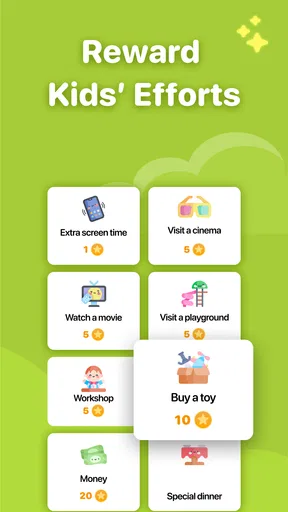
Points and rewards are the feature I would think through most carefully. A child can earn points for completing a chore, then exchange them for a reward the parent has chosen, such as extra screen time or a special treat. The practical benefit is that expectations become visible: the child can see that a task has a consequence beyond another verbal reminder. But points are only motivating when the exchange feels fair and understandable to the child.
I’d start with a small number of familiar chores and rewards rather than turning every helpful action into a transaction. For example, a parent might assign putting away toys and setting the table, then agree in advance what completing those tasks earns. Keeping the reward modest and consistent makes it easier to explain the connection between effort and outcome. If every ordinary family contribution requires a prize, the system can become harder to sustain and may crowd out the idea that some tasks are simply part of living together.
Deadlines can add useful structure, but I would treat them as a guide rather than a reason to pressure a child who is still learning. A deadline is most helpful when it fits the family’s actual rhythm: a task due before bedtime is clearer than an arbitrary time that clashes with dinner or homework. Parents can use the app to make expectations concrete while still allowing room to teach, remind, or help when a child is unsure how to begin.
Set up chores that children can actually finish
The app supports child profiles with names and avatars, suggested chores, and custom tasks. That gives parents room to shape the list around their own home instead of accepting a one-size-fits-all chart. I’d write each task as a small, observable action, such as “put the books back on the shelf,” rather than a broad instruction like “clean your room.” The more specific wording makes it easier for a child to know when the task is complete and for a parent to confirm it without reopening the whole discussion.
A practical way to introduce it is to build one child’s list together. Let them choose an avatar, talk through which chores are manageable, and agree on what completion looks like. For younger children, the parent may need to explain or demonstrate a task first; the app can track an expectation, but it cannot teach the physical steps by itself. For older children, custom tasks can make the list feel less babyish and more like a negotiated household responsibility.
It is also worth reviewing the list when routines change. A chore that makes sense on a school day may not fit a weekend, and a task that was easy last month may need to be broken into smaller steps now. Rather than adding more and more items, I’d remove stale tasks and keep the active list short enough that a child can scan it. That small bit of upkeep is the difference between a tracker that stays useful and one that becomes background noise.
Worth Reading Before You Choose

Flipboard Shows What News Apps Must Do Beyond the Feed

Switching to Android Auto Means Rethinking Your Driving Routine

Google Calendar Makes a Crowded Week Easier to Manage

Ludo King Makes the Most of the Minutes Between Plans

Baby Panda World Brings Quick Play to Modern Phones, but Its Game Library Feels Busy

ESPN’s Live Game View Makes Following Close Games Easier
Getting Started with Kids Chores Tracker To Do List
First things first, let me walk you through the setup. The Kids Chores Tracker To Do List is available on both Android and iOS, making it super accessible no matter what device you’re using. Once you’ve downloaded and installed the app, it’s time to create profiles for your kids. Don’t worry; it’s pretty straightforward.
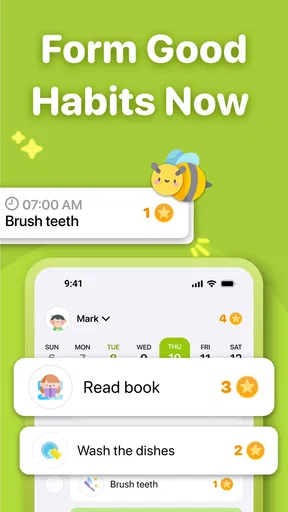
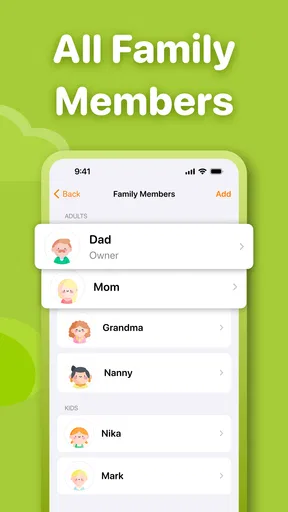
You can add a profile for each child and customize it with their name and even a fun avatar. This little touch adds a bit of personality and makes the kids feel more involved. After setting up the profiles, you can start assigning chores. The app offers a variety of chore suggestions, but you can also create custom tasks to fit your household needs.
Features That Shine
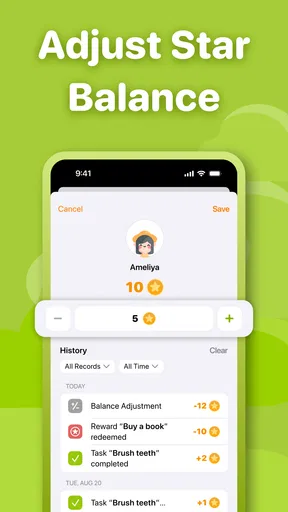
Now, let’s talk features. One of the things I love about this app is the reward system. You can set up a reward system where kids earn points for completing tasks. These points can be exchanged for rewards that you set up, like extra screen time or a special treat. It’s a fantastic way to motivate them.
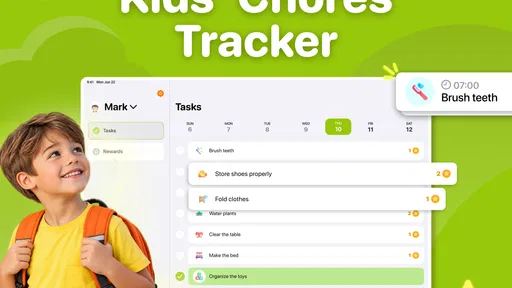
The app also allows you to set deadlines for each chore. This feature helps teach kids about time management, which is a bonus skill they can carry into adulthood. And if you’re worried about staying on top of everything, the app sends you reminders, ensuring that nothing slips through the cracks.
User Experience and Interface
The user interface is super user-friendly, which is a lifesaver when you’re juggling a million things at once. The layout is clean, and navigation is intuitive. You won’t find yourself getting lost in a maze of options, which is exactly what you need when managing a busy household.
Another perk is that the app provides detailed reports. You can track your kids’ progress over time and identify which chores they’re excelling at and which ones might need a bit more encouragement. This feature is great for family meetings where you can discuss progress and set new goals together.
Keeping the Family On Track
Using the Kids Chores Tracker To Do List has been a game-changer in my household. It’s not just about getting the kids to help out; it’s about teaching responsibility and teamwork. The app has turned chore time into something that’s not just tolerable but actually engaging for the kids.
One thing I’ve noticed is that the kids are more proactive. They’re starting to understand the value of contributing to the family and the satisfaction that comes with completing a task. Plus, the points and rewards system adds an element of fun that they really respond to.
Final Thoughts
In conclusion, if you’re looking for a tool to help manage household chores while teaching your kids valuable life skills, give the Kids Chores Tracker To Do List a try. It’s packed with features that make chore tracking a breeze and turns what used to be a struggle into a more harmonious part of family life.
So go ahead, download the app, and watch your household transform into a well-oiled machine. Trust me, you’ll wonder how you ever managed without it!
A school-night routine where the list earns its place
Picture a weekday evening: homework is underway, dinner needs clearing, and a child is being asked for the third time to put away the things left in the living room. This is where I can see a tracker helping. A parent can set a short chore list with a deadline that fits the evening, then point to the agreed task instead of restarting the negotiation from scratch. The child has a visible next step, while the parent can spend less energy remembering and repeating the same instructions.
The useful detail is to keep the app from becoming another task to manage during a busy hour. I’d add recurring household expectations in advance, then check the list at a calm moment rather than composing chores while everyone is rushing. If a child is stuck, I’d help them finish the first time and adjust the task wording later. That makes the tracker a prompt for a routine, not a substitute for teaching or supervision.
How it compares with paper charts and verbal reminders
A paper chart is hard to beat when a family wants a screen-free visual that stays on the refrigerator and can be marked together. Verbal reminders are even simpler, and they cost nothing to set up, but they rely on a parent remembering every task and can make the adult feel like the household’s permanent announcer. This app is more structured than either option: profiles, deadlines, points, and progress reports put chores and motivation in one place.
That structure is not automatically better for every family. A paper chart may suit a very young child who benefits from seeing a physical checklist, while a verbal agreement may be enough for a teenager who already handles regular responsibilities. I’d choose the app when the family needs a shared record, especially when several children have different chores. I’d choose a simpler method if phone access tends to trigger arguments, or if maintaining a digital list would take more effort than the reminders it replaces.
What the reports can—and cannot—settle
Progress reports can give a family a more grounded starting point for a conversation than a vague impression that one child “never helps.” I’d use them to notice patterns: perhaps a child completes short, clear tasks reliably but avoids a chore that feels too large. That observation can lead to a better assignment or a smaller first step. It is more constructive than treating a record as a scorecard or bringing it out only when someone has fallen behind.
There is a judgment call here. A completed task does not always tell the whole story: a child may need coaching, a chore may have been unusually difficult that day, or the family’s expectations may have been unclear. The report is most useful as a conversation aid, not proof that a child is responsible or irresponsible. I’d discuss what went smoothly and what needs changing, then update the task list rather than letting a rough week define the child.
Choosing a fair routine across different ages
When siblings use the same household system, fairness does not have to mean identical chores. One child may be ready for a task another cannot yet manage, and equal point values are not necessarily the fairest way to recognize different levels of effort. I’d talk through the reason for each assignment and make the expected result clear. The app can keep tasks organized, but the parent still needs to make the judgment about age, ability, and the time a chore reasonably takes.
For a child who is easily overwhelmed, I’d avoid filling the screen with a long inventory. A few clear actions are easier to act on than a broad list of everything that needs doing in the house. For a child who likes independence, custom tasks and deadlines may provide enough structure to let them take ownership. These are different needs, and the value of the app is that parents can shape the chores rather than treating every child as if the same list will work.
Practical questions before making it a habit
Families may wonder whether they have to use rewards for every chore. I would not treat that as necessary: the point system is a tool parents can use to motivate selected tasks, while household contributions can still be explained as shared responsibilities. The key is deciding in advance which jobs earn points and what those points mean. If the rules shift after a child has completed a task, trust in the system can quickly erode.
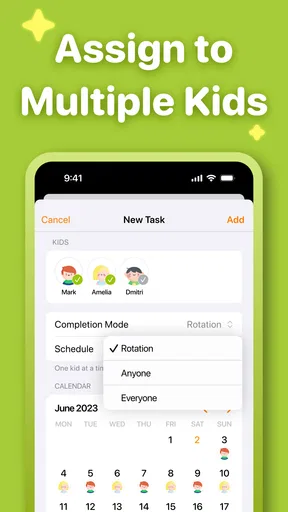
Another reasonable question is whether the app can handle chores unique to a particular home. Custom tasks make it possible to tailor the list, so a family is not limited to the suggested chores. I would use that flexibility carefully: write a task in language the child understands, and avoid combining several unrelated jobs into one item. Smaller entries make it easier to see what has been completed and easier to adjust a task that proves too demanding.
Parents may also ask whether reminders remove the need to check in. They can help keep a chore from slipping past a deadline, but a notification cannot judge whether a child understood the instruction or needs help. I’d regard reminders as backup for the adult’s memory, not as a promise that the app will run the routine independently. The first few days are a good time to see whether the chosen schedule matches real family life and make changes before frustration sets in.
Cost, fit, and the kind of household it serves
The app is free to download, with in-app purchases listed from $3.99 to $69.99 per item. I’d look at what is included in the free experience and consider any purchase deliberately rather than assuming the whole system requires spending. It is rated for Everyone, and the current version is 2.25.1, with Android 7.0 as the minimum operating-system requirement. The developer is NEATKID KIDS CHORE TRACKER AND REWARD CHART, and the app sits squarely in the parenting space rather than trying to be a general family calendar.
Its audience is clear: parents who want to make chores visible, motivate children with agreed rewards, and review progress over time are the people most likely to get lasting value. It may also help caregivers who share responsibility for a child, provided they agree on task wording and reward rules so the child is not given conflicting expectations. Neat Kid has a 4.7 average from around 1.2 thousand ratings and has been installed over 50 thousand times; those figures suggest it has found an audience, but I’d still judge it by whether the routine fits your home.
I would skip it if you want a hands-off solution, dislike tying points to chores, or prefer a completely screen-free household chart. It also may not be worth maintaining if your children already manage tasks reliably and a quick family conversation is enough. For everyone else, I see its strongest use not as a magic fix for reluctance, but as a practical way to make expectations consistent. Start with a few chores, agree on fair rewards, and keep reviewing the list together. If that reduces repeated reminders without turning family life into a points contest, the app is doing the job I’d want from it.
Pros
- User-friendly interface for easy tracking.
- Customizable tasks for each child.
- Reward system motivates kids effectively.
- Syncs across multiple devices seamlessly.
- Parental controls ensure secure usage.
Cons
- Limited free version features available.
- No offline mode for task updates.
- Notifications can be overwhelming.
- Initial setup can be time-consuming.
- Requires regular updates for smooth performance.
FAQs for Kids Chores Tracker To Do List
What is the main purpose of the Kids Chores Tracker To Do List app?
The Kids Chores Tracker To Do List app is designed to help parents and guardians manage and organize their children's daily chores and responsibilities. The app allows users to create, assign, and track tasks, providing a structured way for children to learn about responsibility and time management. Additionally, it often includes reward systems to motivate kids.
Is the Kids Chores Tracker To Do List app user-friendly for both parents and children?
Yes, the app is designed with an intuitive interface that is accessible for both parents and children. Parents can easily set up tasks and monitor progress, while children can effortlessly view and check off completed chores. The simplicity of navigation ensures that users of all ages can engage with the app smoothly.
Does the app include any features to incentivize children to complete their chores?
Indeed, the Kids Chores Tracker To Do List app often incorporates a reward system to motivate children. Users can set up points or rewards for completed tasks, which can be redeemed for treats or privileges. This gamified approach encourages children to complete their chores while understanding the value of effort and responsibility.
How customizable are the tasks and chores within the app?
The app offers a high level of customization, allowing parents to tailor tasks to suit each child's age, capability, and schedule. Users can specify task details, set deadlines, and adjust the frequency of chores. This flexibility ensures that the app accommodates diverse family routines and preferences.
Is the Kids Chores Tracker To Do List app available on both Android and iOS platforms?
Yes, the app is available for download on both Android and iOS platforms. Users can find it on the Google Play Store and the Apple App Store, ensuring accessibility for a wide range of devices. This cross-platform availability allows families to stay organized regardless of their preferred operating system.


